![gezondeboel.nlwp-contentuploads201911Gezondeboel-logo-white.png]](https://support.therapieland.nl/hs-fs/hubfs/gezondeboel.nlwp-contentuploads201911Gezondeboel-logo-white.png?height=40&name=gezondeboel.nlwp-contentuploads201911Gezondeboel-logo-white.png)
You can send a questionnaire to a client, view the results and download the results.
Downloading the results
You can download the results of a questionnaire directly from the results page. Navigate to the Report tab and click on the print icon there. This will open the report in a popup, so make sure your browser does not block popups.
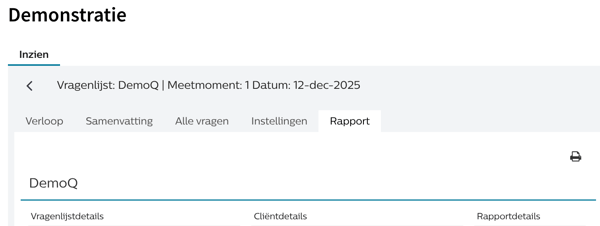
After you have opened the report, you can download and save it.
Can't find the answer?
Send us an email via info@therapieland.nl of info@gezondeboel.nl
You can also reach us by phone, from Monday to Friday between 9.00 and 16.30h via 020-7712848 for Therapieland or via 020-8545108 for Gezondeboel.